Introduction
If you work at Starbucks or are about to join, then you might have heard of “Starbucks Partner Hours.”
Starbucks doesn’t call their employees staff, instead they’re treated as “Partners” and to track their work-life balance, the scheduling system runs on a technology-driven model. Is it just a normal mobile app? Of course not!
If you want to know all about Starbucks work schedule management, then you’re at the right place.
This article talks about everything from the Starbucks scheduling process, shift swaps, to maximum barista hours.
ALSO READ: Taiwan Car Rental Guide: Best Options, Costs & Travel Tips
What is the Starbucks Partner Hours App and Portal?
“Starbucks Partner Hours” is an official internal digital tool for employees (partners). It assists staff in managing schedules, swapping shifts, requesting time off, and allows partners to access company benefits from personal devices.
Core Features
Schedule Management: You can view your upcoming work schedules in real time.
Shift Swaps: Partners can post the shifts with eligible coworkers.
Time Off: You can submit a time-off request directly through the app or portal.
Partner Hub: Easy access to company news, HR documents, and benefit information.
Step-by-Step Guide: How to Log In and Download the App
“Starbucks Partner Hours” is a secured platform that you can’t operate directly through a download from public app stores. The process is divided into three simple parts:
Part 1: Download & Login through Intelligent Hub
Install Hub App: Download the Workspace ONE Intelligent Hub app from either App Store or Play Store.
Connect Network: Open the app and give camera access to scan back office posters or the Starbucks enrollment QR code.
Manual Entry Option: If QR code scan is not working, manually enter the server address appcafe.starbucks.com and Group ID PARTNER (all caps).
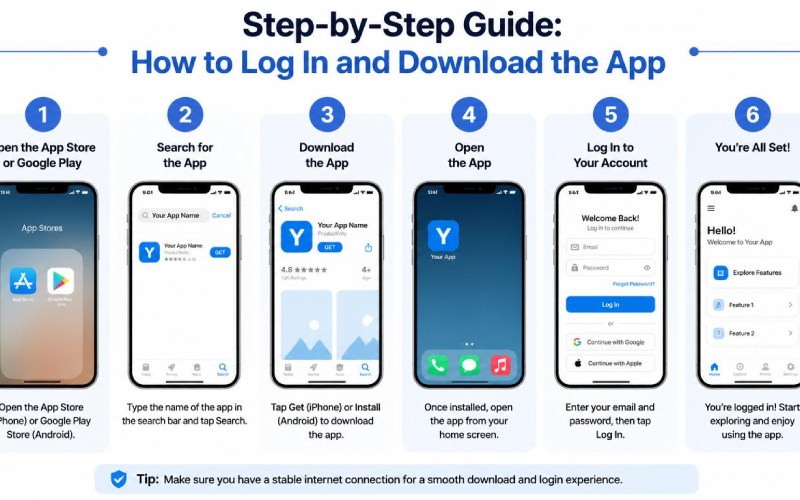
Log In: Enter your Global username and password to enroll.
Part 2: Install the Partner Hours App
Open Private Store: After enrollment, you’ll be redirected to a secure repository—App Cafe for iOS users and the Work/Enterprise tab for Android users.
Install App: Download the official SBUX Partner Hours app from there.
For iPhone Users: open phone Settings > General > VPN & Device Management and trust the Starbucks profile.
Part 3: Log In to Partner Hours & Web Portal
App Login: Open Partners Hours app. When asked for an email, enter your GlobalUsername@starbucks.com. It will take you through the official password screen.
Web Portal Access: If you don’t want to use the app, then you can directly browse the Starbucks Partner Portal and access the platform.
How Starbucks Forecasts and Creates Weekly Schedules
Starbucks uses advanced AI-driven forecasting and local manager experience to create a weekly schedule. After predicting the exact customer traffic of every store, this schedule is designed, which is posted every Friday.
This complete process works in 4 simple steps:
1. AI-Driven Demand Forecasting (Deep Brew Technology)
Starbucks uses an AI platform “Deep Brew” to predict a store’s demand in variables such as:
Historical Data: Analyzing old sales and orders.
Local Variables: Real-time data of weather, local events and holidays.
Customer Trends: Tracking patterns of Local buying behavior and mobile app orders.
2. Labor Hour Allocation (Exact Hours Calculation)
When Deep Brew predicts customer traffic, then AI automatically calculates:
Rush Hours: At peak hours, how many baristas will be required?
Automated Software: This automated software removes the hassle of manually creating scheduling grids, making things much easier for store managers.
3. Manager Customization & Team Availability
Managers take the base schedule generated by the AI and modify it as per their team:
Partner Availability: It automatically adds partners’ availability, time off, and required hours.
Task Allocation: At rush hours, managers keep experienced partners on the floor to take fast orders and smooth handoffs.
4. Schedule Release
Weekly Report: The final schedule is digitally posted every Friday.
Online View: Partners can check weekly schedules on the app.
Understanding Shifts, Breaks, and Benefits Eligibility
At Starbucks, shifts, breaks, and benefits are directly connected to your working hours.
1. Meal and Rest Breaks Policy
4–6 Hours Shift: One paid break of 10-15 minutes.
6+ Hours Shift: 30 minutes of an unpaid meal break and a paid break.
8 Hours Shift: 2 short paid breaks and 1 unpaid meal break.
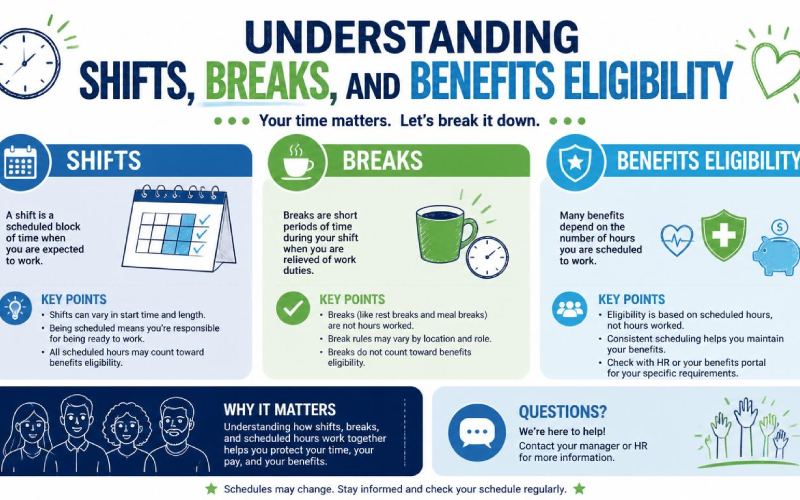
2. Full-Time vs Part-Time Hours
Part-Time Baristas: Weekly 15-25 hours with flexible schedule.
Full-Time Staff: Weekly 32-40 hours, which are mostly assigned to shift supervisors.
3. Starbucks Benefits Threshold Rule
Starting Rule: For health and tuition benefits, the first 3 months and 240 hours are required.
Monthly Rule: Employees must work an average of 20 hours per week to keep their benefits active.
Core Features of the Partner Schedule Template
The Starbucks Partner Hours app has many features that make employees’ schedules easy and flexible:
Real-Time Notifications: Whenever there is a change to the schedule, partners receive an instant notification on their phone.
Shift Swaps: In emergencies, partners can swap their shifts through the app.
Time-Off Requests: For time-off partners, they can directly select dates from the calendar and request advance leave to the manager.
My Partner Info Integration: The app provides a direct link to the MPI portal, where partners can access pay stubs, tax information, and digital W-2 forms.
Common On-Ground Challenges Faced by Baristas
Partners have to deal with a lot on a daily basis on the floor hat can be exhausting after a point:
Complex Customization: Complex drink hacks and modifiers can exhaust baristas and are even difficult to remember.
Shortage of Staff: During peak hours, a shortage of staff can increase stress levels and workload for employees.
Overlapping Orders: In-store, drive-thru, and mobile app orders all along can create confusion and rush.
Physical Strain: Continuous heavy milk crate lifting, frequent bending, and repetitive arm movements can lead to back, wrist, and joint pain.
Scheduling & Hours Issue: Unpredictable schedules can affect your personal life.
Pro Tips to Increase Your Barista Hours
If you want to increase your weekly working hours at Starbucks, follow these smart tips:
1. Work During Peak Hours: Offering service on morning rushes, weekends, and holidays, you can get more shifts.
2. Broaden Availability: Don’t block your hours; managers always keep flexible partners ahead.
3. Check App Constantly: Take constant updates on the app so that you can quickly pick up mid-week shifts dropped by other employees.
4. Network with Other Stores: You can even contact nearby Starbucks outlets to offer vacant positions.
5. Have the “Hours Talk”: Have a clear conversation with the manager about increasing working hours.

Wrap Up
The Starbucks Partner Hours app is not just a scheduling tool; it works to blend work-life balance and corporate algorithms. If you put effort into understanding availability, communication, and smart use of the apps, you can bring the best out of your work. The platform is really beneficial for partners, and if you navigate the system right, you can make a healthy work-life balance.
FAQs
Q1. Why is the Starbucks Partner Hours app not directly available at public App Stores?
It is a highly secure enterprise platform. To install this, you first need to download the Workspace ONE Intelligent Hub gateway.
Q2. Where can I get the official QR Code of the SBUX Partner Hours app?
You can easily find it at your store’s back office poster or at the Partner Central portal after login.
Q3. If the Starbucks Partner Hours app is down, how can you check your schedule?
If the server is down, you can directly browse the official website or contact your Store Manager for updates regarding the portal service status.